Overcoming PHPMYADMIN #1273 UNKNOWN COLLEATION UTF8MB4_UNICODE_CI
Last updated
One of the obstacles that we often face when deploying the website to the server or moving a website from a different hosting or VPS is restore database.
Generally, the restore database problem is caused by a large database size or size or a different database version (MySQL/MariaDB) and the problem that we will discuss at this time is an error #1273 Unknown Kollation UTF8MB4_unicode_ci or Unknown Kollation: ‘utf8mb4_unicode_520_ci’ When doing restore.
What is Collation and why is the Unknown Collation error appears?
Collaction is a set of rules in the MySQL/Mariadb database that functions to compare existing characters by caracter set. Caracter itself is a set of certain characters supported by MySQL/MariaDB.
#1273 UNKNOWN COLLEATION UTF8MB4_UNICODE_CI occurs because the previous database uses the UTF8MB4_unicode_CI Collation and is not supported in the current database version.
We can run the following command on MySQL to check whether UTF8MB4_unicode is supported or not
MySQL > SHOW COLLATION LIKE 'utf8mb4_unicode';
Empty set (0.00 sec)
And
MySQL > SHOW COLLATION LIKE 'utf8mb4_unicode_520_ci';
Empty set (0.00 sec)
If the results are empty as above, then it means that the database we use today does not support the colletion.
How to Overcome PHPMYADMIN #1273 UNKNOWN COLLEATION UTF8MB4_UNICODE_CI
The easiest solution for this is to change the database collection with a standard collection.
Copy backup of the previous database (for backup purposes) and from SSH we can run the following command to change the collaration:
sed -i 's/utf8mb4_unicode_520_ci/utf8_general_ci/g' backup.sql
sed -i 's/utf8mb4/utf8/g' backup.sql
The command above will change the character Utf8mb4_unicode_520_ci become Rain And UTF8MB4 become UTF8.
Or if the database is not too large, try to open the database file using Notepad ++. After opening, take a search for UTF8MB4 and Replace to UTF8.
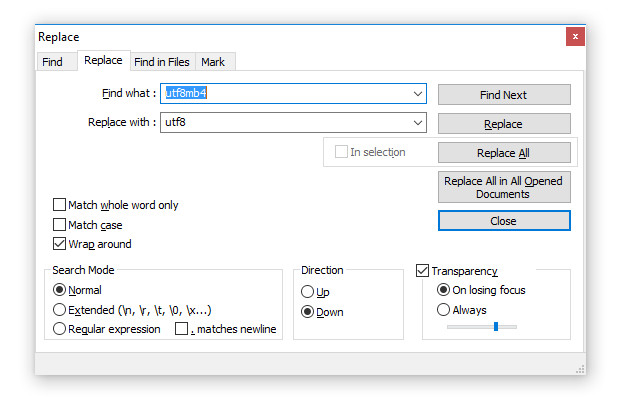
Do the same for characters Utf8mb4_unicode_520_ci become Rain
After we replace it, please try to restore or upload the mysql database backup again. Now the database should be well restrained.
Good luck 🙂.
Game Center
Game News
Review Film
Rumus Matematika
Anime Batch
Berita Terkini
Berita Terkini
Berita Terkini
Berita Terkini
review anime
Comments are closed, but trackbacks and pingbacks are open.